Creating Stunning 3D Wall Art with Seascape Multilayer Laser Files
In the evolving world of digital crafting and home decor, few trends have captured the imagination of makers quite like 3D multilayered wall art. This technique transforms flat materials into dynamic, shadow-play masterpieces that add depth and texture to any room. At the heart of this creative revolution are precision-designed digital files, such as the Seascape 3D SVG Multilayer Laser Files. Whether you are a seasoned CNC operator or a hobbyist using a desktop cutting machine, understanding how to utilize these files can elevate your projects from simple crafts to professional-grade decor.
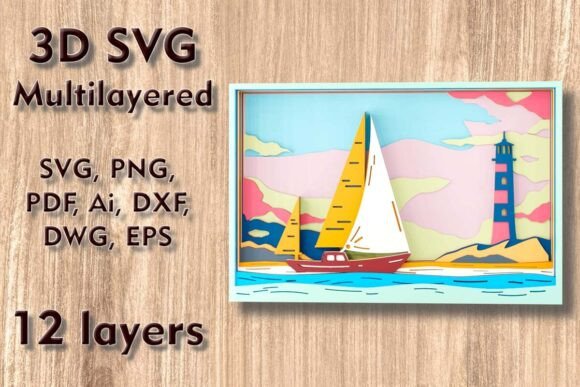
The Seascape Mundala SVG is a prime example of this technology in action. It is not merely a picture; it is a complex assembly of twelve distinct layers that, when stacked, create a breathtaking illusion of ocean waves, sand, and sky. This article explores the intricacies of these files, the materials best suited for them, and how you can bring this enchanting design to life in your own home.
Understanding the Design: Layers and Dimensions
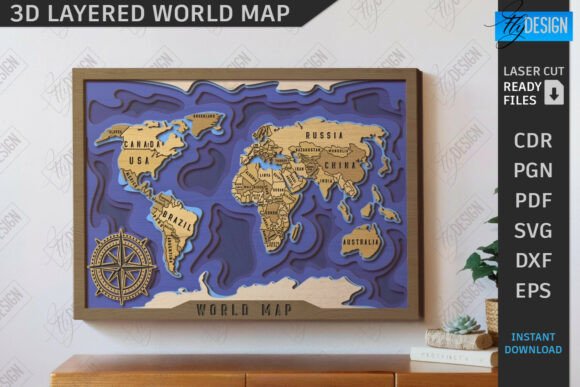
To appreciate the value of the Seascape design, one must first understand its structure. The file consists of 12 separate layers. Each layer represents a different depth plane of the seascape. When cut and assembled, the gaps between these layers allow light to pass through, creating natural shadows that enhance the three-dimensional effect. This "shadow box" style is what gives the artwork its magical, immersive quality.
The standard dimensions for this specific design are 295 mm wide by 195 mm high (approximately 11.6 x 7.7 inches). This size is ideal for desk displays, shelf accents, or as part of a larger gallery wall. However, flexibility is a key feature of vector-based designs. You can easily increase the size of the design to create a large statement piece for your living room.
Important Note on Scaling: While enlarging the design is generally safe, reducing the size requires caution. The design contains thin, delicate elements that represent fine details like wave crests or sand textures. If you scale the image down too much, these thin lines may become too fragile to cut cleanly or may break during the weeding and assembly process. Always preview your cut path at the desired size to ensure structural integrity.
Compatibility and File Formats
One of the greatest advantages of the Seascape 3D SVG package is its universal compatibility. Modern crafters use a wide variety of machines, from consumer-grade die-cutters to industrial laser engravers. To accommodate this diversity, the download includes a ZIP folder containing multiple file formats:
- SVG and Layered SVG: Perfect for Cricut Design Space, Silhouette Studio, and other vector-based software. The layered SVG keeps each of the 12 parts separate, saving you hours of manual separation work.
- DXF and DWG: Ideal for users of AutoCAD or those operating CNC routers that prefer these engineering-standard formats.
- EPS and AI: Essential for Adobe Illustrator users who wish to edit or customize the design further before cutting.
- PNG and PDF: Useful for previewing the design, printing paper prototypes, or sharing visual references.
This versatility ensures that whether you are using a Cricut Maker, a Silhouette Cameo, a Glowforge laser cutter, or a professional CNC router, you can unlock the magic of this design without needing complex conversion tools.
Choosing the Right Materials
The material you choose dramatically affects the final aesthetic of your Seascape wall art. The design is optimized for a variety of substrates, each offering a unique look and feel.
Wood and Plywood
For a rustic, natural, or high-end look, plywood and MDF (Medium-Density Fiberboard) are excellent choices. Wood provides rigidity, allowing the layers to stand off the backboard effectively. Light-colored plywood, such as birch, highlights the natural grain, adding organic warmth to the seascape theme. When using wood, a laser cutter or CNC router is typically required to achieve clean edges on all 12 layers.
Paper and Cardstock
If you are using a blade-based machine like a Cricut or Silhouette, cardstock and paper are your best options. Heavyweight cardstock (65lb or higher) is recommended to prevent warping. Paper crafts are lighter and easier to ship, making them perfect for creating handmade greeting cards or gifts for friends and family. You can experiment with colored paper to mimic the blues of the ocean and the whites of the foam, eliminating the need for painting.
Acrylic and Aluminum
For a modern, sleek appearance, acrylic offers a translucent quality that interacts beautifully with light. Backlighting an acrylic seascape can create a glowing, ethereal effect. Aluminum sheets can be used for a metallic, industrial vibe, though this typically requires more powerful cutting equipment.
Step-by-Step Assembly Guide
Creating your 3D Seascape is a rewarding process that combines precision cutting with artistic assembly. Here is a general workflow to help you succeed:
- Prepare Your Files: Unzip the downloaded folder and import the appropriate file format into your machine’s software. Ensure that all 12 layers are visible and correctly aligned.
- Material Setup: Secure your chosen material (plywood, cardstock, etc.) to the cutting mat or laser bed. Perform a test cut if you are using a new material thickness to adjust focus and power settings.
- Cutting: Execute the cut. If you are cutting 12 layers from wood, this may take some time. Patience is key to ensuring clean edges.
- Weeding and Cleaning: Remove the excess material from each layer. For intricate designs, use tweezers to carefully remove small inner pieces without breaking the delicate connections.
- Layering: This is the most critical step. Start with the background layer (usually the sky or deepest water) and adhere it to your base board. Use foam tape, spacers, or glue dots between each subsequent layer to create physical depth. Follow the numerical order provided in the file names (Layer 1, Layer 2, etc.) to ensure the correct perspective.
- Framing: Once all layers are adhered, place the artwork in a deep-shadow box frame to protect it and give it a finished, professional look.
Why Choose Multilayer SVG Designs?
In an era of mass-produced home decor, handmade items carry a special significance. Using files like the Seascape 3D SVG allows you to create one-of-a-kind pieces that reflect your personal style. These designs are not just about aesthetics; they are about the experience of creation. The process teaches spatial awareness, material handling, and digital design skills.
Furthermore, these projects make exceptional gifts. A handmade 3D seascape conveys thoughtfulness and effort, making it a cherished present for housewarmings, birthdays, or holidays. The calming imagery of the ocean also adds a element of tranquility to living spaces, aligning with biophilic design principles that seek to connect indoor environments with nature.
Tips for Success
To ensure your project turns out perfectly, consider these expert tips:
- Contrast is Key: If using monochrome materials like plain wood, consider staining or painting alternating layers slightly differently to enhance the visibility of the depth.
- Check Kerf Width: Laser cutters remove a small amount of material (kerf) during cutting. If your layers fit together tightly, account for this in your software settings to ensure a snug fit.
- Lighting Matters: Position your finished artwork where ambient light can hit it from an angle. This maximizes the shadow effects that define the 3D look.
- Start Small: If you are new to multilayer cutting, try assembling a smaller section or using paper first to understand the layering logic before committing to expensive wood or acrylic.
Conclusion
The Seascape 3D SVG Multilayer Laser Files represent a perfect blend of technology and artistry. With 12 meticulously designed layers, compatible file formats for every major cutting machine, and support for diverse materials ranging from paper to aluminum, this design opens up a world of creative possibilities. Whether you are looking to upgrade your home wall decor, create a unique gift, or simply enjoy the therapeutic process of crafting, this seascape design offers a pathway to creating something truly enchanting. By respecting the design’s constraints regarding scaling and choosing the right materials for your tools, you can transform a digital file into a tangible masterpiece that captures the serene beauty of the ocean.