Kitchen Wall Sign Laser Cut Bundle: A Practical Guide for DIY Creators
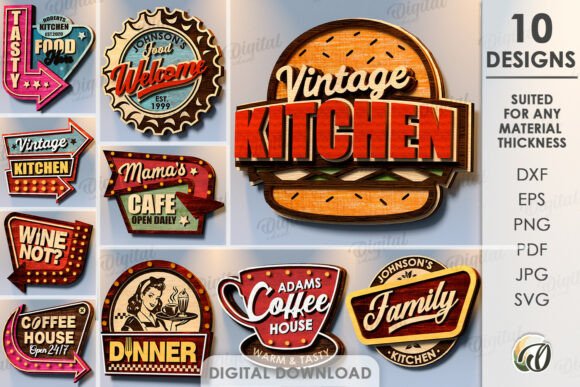
The trend of personalized home décor has shifted significantly toward custom, handcrafted elements, with kitchen signage becoming a focal point for many interior design projects. For makers, crafters, and small business owners, the Kitchen Wall Sign Laser Cut Bundle offers a streamlined solution for producing high-quality wall inscriptions. This digital product is designed specifically for compatibility with laser cutting machines, providing a comprehensive set of files that simplify the transition from concept to physical object. Understanding the components, compatibility requirements, and practical applications of this bundle is essential for determining whether it aligns with your specific crafting goals.
Understanding the Product Components
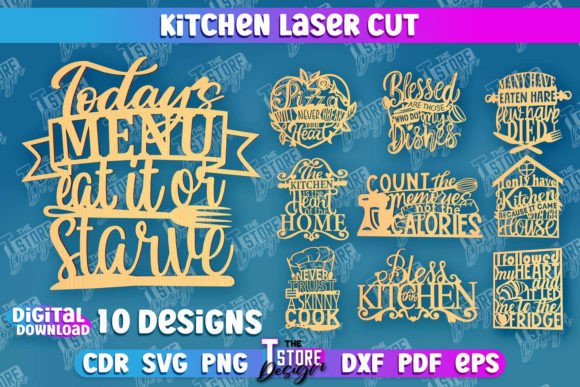
At its core, this product is a digital asset package rather than a physical item. It serves as a template library for creating kitchen-themed wall signs. The bundle is structured to accommodate various stages of the fabrication process, from initial design visualization to final machine execution. The inclusion of multiple file formats ensures that users with different software preferences and hardware capabilities can utilize the designs effectively.
The archive contains ten distinct designs, each provided in five standard file formats: SVG, EPS, PNG, PDF, and DXF. This variety is crucial because different laser cutting software ecosystems prefer specific vector or raster formats. For instance, SVG and DXF files are widely supported by popular hobbyist laser cutters, while EPS files are often preferred in professional graphic design environments. The PNG files serve a dual purpose: they allow for quick visual previews and can be used for sublimation printing or other non-cutting applications if desired.
Technical Specifications and Machine Compatibility
One of the most critical aspects of using any laser cut template is understanding how the design translates to machine instructions. This Kitchen Wall Sign Laser Cut Bundle utilizes a standardized color-coding system to distinguish between cutting paths and engraving areas. Specifically, red lines indicate where the laser should cut through the material, while black lines designate areas for engraving or etching. This distinction is vital for achieving clean, professional results without manual intervention in the software.
However, compatibility is not universal. Users must ensure that their specific cutting machine and accompanying software can interpret these color codes correctly. While most modern laser controllers recognize red and black layers for separate operations, some entry-level machines may require manual layer separation or setting adjustments. It is advisable to review your machine’s manual or software documentation to confirm that it supports multi-layer processing based on color. If your workflow involves converting files between formats, such as importing an SVG into a proprietary format, verify that the conversion process preserves the vector integrity of the cut lines.
Benefits for Makers and Small Businesses
For individuals looking to start a side hustle in home décor or those who simply enjoy DIY projects, this bundle offers several tangible benefits. The primary advantage is time efficiency. Creating intricate typography and decorative elements from scratch requires significant design skill and hours of work. By utilizing pre-made templates, creators can bypass the design phase and focus entirely on production. This allows for faster turnaround times when fulfilling customer orders or completing personal projects.
Additionally, the versatility of the file formats supports scalability. Whether you are cutting a small sign for a personal kitchen or a larger piece for a commercial space, vector files like SVG and DXF can be resized without losing quality. This scalability ensures that the design remains crisp and precise regardless of the final dimensions. Furthermore, the availability of PDF and PNG files provides flexibility for marketing materials, allowing sellers to create mockups and promotional content without needing additional design software.
Considerations and Potential Tradeoffs
While the convenience of a pre-packaged bundle is appealing, there are tradeoffs to consider. The most notable limitation is the lack of exclusivity. Since these files are available for purchase by anyone, other makers may produce identical signs. For businesses aiming to establish a unique brand identity, relying solely on public domain or commercially available bundles may dilute their distinctiveness. In such cases, customizing the files—by adjusting fonts, adding unique graphical elements, or combining multiple templates—becomes necessary to create a differentiated product.
Another consideration is material selection. The success of the laser cutting process depends heavily on the material used. Wood, acrylic, and MDF are common choices, but each reacts differently to laser heat. Thin materials may warp, while thicker materials may require multiple passes, potentially affecting the precision of the engraved details. Users should conduct test cuts on scrap material to determine the optimal power and speed settings for their specific machine and material combination.
Ideal Use Cases
This Kitchen Wall Sign Laser Cut Bundle is particularly well-suited for several scenarios. It is an excellent resource for hobbyists who own a laser cutter but lack advanced graphic design skills. It allows them to produce professional-looking décor without a steep learning curve. Similarly, small business owners who specialize in personalized gifts can use these templates as a base for customization. For example, a seller might add a family name or a specific date to the existing design, offering a semi-custom product that appeals to a broader audience.
Educational settings also benefit from such bundles. Vocational training programs or maker spaces can use these files to teach students about vector graphics, laser safety, and machine operation. The clear distinction between cut and engrave lines provides a straightforward lesson in how digital designs translate to physical manufacturing processes.
When to Consider Alternatives
There are situations where alternative solutions may be more appropriate. If you require a completely unique design that reflects a specific brand aesthetic or niche theme, hiring a graphic designer or creating custom artwork may be a better investment. Additionally, if your laser machine does not support color-based layer differentiation, you may find it cumbersome to manually separate the cut and engrave paths in your software. In such cases, looking for bundles that provide separate files for cutting and engraving, or investing in software that automates layer management, could save time and reduce frustration.
Furthermore, if you do not own a laser cutter, this product may not be the most cost-effective option unless you have access to a local maker space or a service bureau. In those instances, purchasing a finished product or using a print-on-demand service might be more practical.
Making an Informed Decision
Choosing the right digital assets for your crafting projects involves evaluating your technical capabilities, design needs, and business goals. The Kitchen Wall Sign Laser Cut Bundle provides a robust foundation for creating stylish kitchen décor, offering flexibility through multiple file formats and clear instructions for machine operation. By understanding the technical requirements and potential limitations, you can determine whether this bundle fits seamlessly into your workflow.
Before purchasing, consider reaching out to the seller if you have specific file format requirements or need variations in PNG color or size. Many creators are willing to accommodate reasonable requests, enhancing the value of the product. Additionally, following the shop can keep you informed about future releases, ensuring you stay updated on new designs and trends. Ultimately, this bundle serves as a practical tool for those ready to leverage laser cutting technology to bring creative kitchen signage to life.