Transforming Flat Designs into Dimensional Art with Rose 3D SVG Multilayer Cutting Files
In the evolving world of digital crafting, the line between simple paper crafts and sophisticated interior decor is becoming increasingly blurred. Hobbyists and professional makers alike are constantly seeking ways to add depth, texture, and visual interest to their projects. This is where Rose 3D SVG Multilayer Cutting Files come into play, offering a bridge between digital precision and tangible beauty. By utilizing layered designs, crafters can transform flat materials like plywood, cardstock, or acrylic into stunning three-dimensional wall art that captures the eye and elevates any living space.
The appeal of multilayered designs lies in their ability to mimic the complexity of hand-carved art without requiring years of sculpting experience. A single sheet of material, no matter how intricately cut, often lacks the shadow and depth that make a piece feel "alive." By stacking multiple layers, each slightly different in shape or detail, you create natural shadows and highlights. The rose, a timeless symbol of elegance and romance, serves as a perfect subject for this technique. Its organic curves and overlapping petals translate beautifully into a layered format, allowing light to play across the surface of the finished piece.
Understanding the Design Specifications and Dimensions
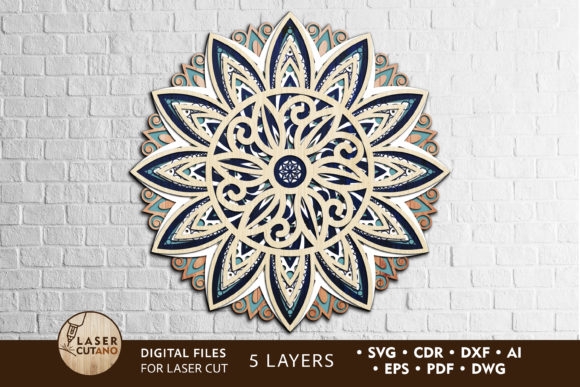
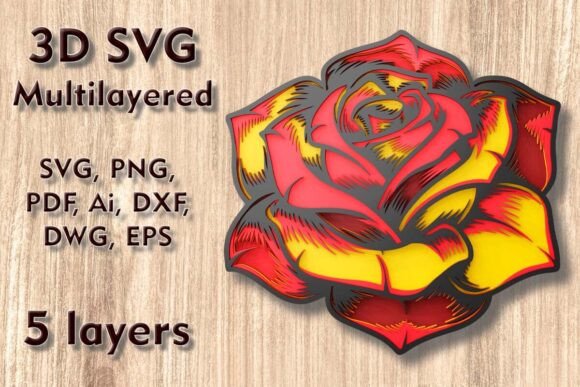
When working with digital files for physical production, understanding the base dimensions is crucial for planning your project. The Rose Mundala Svg design provided in this package comes with a standard size of 250 mm width by 240 mm height, which translates to approximately 9.9 x 9.5 inches. This size is ideal for medium-sized wall decor, shelf accents, or as a central element in a larger gallery wall. It is substantial enough to showcase the intricate details of the five distinct layers but compact enough to fit comfortably in most home environments.
One of the most significant advantages of using vector-based formats like SVG, DXF, and AI is scalability. You can easily increase the size of the design to create a statement piece for a large living room or entryway. However, caution is advised when reducing the size. The design features delicate, thin elements that are essential to the aesthetic of the rose. If you scale the file down too aggressively, these fine lines may become too fragile to cut cleanly or may break during the weeding and assembly process. Always consider the physical limitations of your chosen material before shrinking the design significantly.
The Importance of Five-Layer Construction
This specific design consists of five separate layers. This number is not arbitrary; it represents a sweet spot in multilayer crafting. Fewer layers might result in a flatter, less impressive look, while significantly more layers can make the assembly process tedious and the final piece overly thick or heavy. With five layers, you achieve a pronounced 3D effect that provides substantial depth. Each layer builds upon the previous one, starting from the broadest background shapes and moving toward the finest details of the rose petals and surrounding mandala-like patterns.
The separation of these layers allows for creative customization. You are not limited to using the same material or color for every tier. For instance, you might choose a dark walnut plywood for the base layers to create a strong contrast, while using a lighter birch or even painted cardstock for the top layers to highlight the intricate petal details. This flexibility enables crafters to match the artwork to specific interior design schemes, whether modern, rustic, or bohemian.
Material Versatility: From Wood to Acrylic
The versatility of the Rose 3D SVG Multilayer Cutting Files is one of its strongest assets. The files are compatible with a wide range of materials, allowing you to tailor the final product to your desired aesthetic and durability requirements. The supported materials include:
- Plywood and Wood: Ideal for a warm, natural look. Birch plywood is a favorite among laser cutters for its clean edges and light color, which takes stain and paint well.
- MDF (Medium-Density Fiberboard): Offers a smooth surface perfect for painting. It is dense and sturdy, making it excellent for durable wall hangings.
- Cardstock and Paper: Perfect for intricate, lightweight decorations, greeting cards, or temporary event decor. Paper layers allow for extremely fine details that might be challenging in wood.
- Acrylic: Provides a modern, sleek appearance. Transparent or colored acrylics can create interesting light-refracting effects, especially if backlit.
- Cardboard: An eco-friendly and cost-effective option, great for prototyping or rustic-themed crafts.
- Aluminum: For industrial or modern metallic finishes, though this requires specific cutting capabilities.
Choosing the right material depends largely on your cutting machine. Laser cutters, such as the Glowforge, excel at cutting wood, acrylic, and cardboard with high precision. CNC routers are robust options for thicker plywood and MDF. Meanwhile, electronic cutting machines like Cricut and Silhouette are best suited for paper, cardstock, and thin vinyl or adhesive-backed materials. Understanding your machine's capabilities ensures that you select a material that will yield clean cuts and minimal post-processing.
File Formats and Workflow Integration
Upon purchase, you receive a comprehensive ZIP folder containing a variety of file formats, ensuring compatibility with virtually any design software or cutting machine. The package includes:
- SVG and Layered SVG: The most common format for web-based design tools and many cutting machine apps. The layered SVG is particularly useful as it keeps the five layers separate, saving you time on manual separation.
- DXF and DWG: Standard formats for CAD software and CNC machining, preferred by users of industrial routers or advanced design programs.
- EPS and AI: Vector formats compatible with Adobe Illustrator and CorelDRAW, allowing for extensive editing and customization before cutting.
- PNG and PDF: Raster and document formats useful for previewing the design, creating printed instructions, or using in graphic design projects that do not involve cutting.
It is important to note that no physical product will be sent to you. You are purchasing digital files only. This immediate access allows you to start your project right away, without waiting for shipping. However, it also places the responsibility of material sourcing and cutting on you. Ensure you have the necessary supplies and machine settings calibrated before beginning.
Practical Tips for Assembly and Finishing
Creating a masterpiece from Rose 3D SVG Multilayer Cutting Files involves more than just cutting; the assembly process is where the magic happens. To ensure a professional finish, consider the following recommendations:
Test Cut First: Before committing your final material, perform a test cut on a scrap piece. This helps you verify the scale, check for any problematic thin elements, and adjust your machine’s power and speed settings. This step is crucial when working with expensive materials like hardwoods or acrylics.
Sanding and Cleaning: If you are using wood or MDF, laser cutting can leave burn marks or soot on the edges. Lightly sanding the edges or wiping them with a damp cloth can significantly improve the appearance. For acrylic, removing the protective film before or after cutting (depending on your preference) ensures a crystal-clear finish.
Adhesive Selection: Use a strong, clear-drying adhesive suitable for your material. Wood glue works well for plywood and MDF, while specialized acrylic cement is necessary for bonding acrylic layers. For paper and cardstock, a precision glue pen or double-sided tape can prevent warping and keep the layers aligned.
Alignment Jigs: Aligning five layers perfectly can be challenging. Consider creating a simple alignment jig using cardboard or scrap wood. Mark the corners of the base layer on the jig, and use these marks to position each subsequent layer accurately. This ensures that the concentric details of the rose remain centered and symmetrical.
Elevating Home Decor with Digital Craftsmanship
The final result of using these files is more than just a craft project; it is a piece of personalized home decor. A 3D rose wall art piece adds texture and warmth to blank walls, serving as a focal point in bedrooms, living rooms, or even commercial spaces like boutiques and cafes. The interplay of light and shadow created by the five layers changes throughout the day as natural light moves across the room, giving the artwork a dynamic quality.
Whether you are a seasoned maker looking to expand your portfolio or a beginner eager to try 3D papercraft, the Rose Mundala Svg offers a rewarding challenge. It combines the precision of digital technology with the tactile satisfaction of hands-on assembly. By unlocking the potential of these high-quality SVG files, you can create enchanting decor that reflects your unique style and craftsmanship. Embrace the versatility of modern cutting machines and let your creativity flourish with every layer you stack.