Ballerina Two-Layer Silhouette Laser Cut Guide
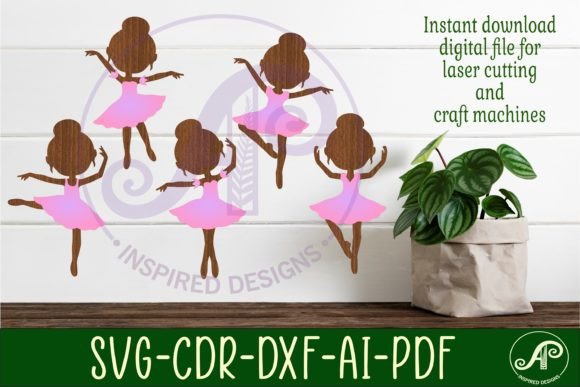
There is a distinct satisfaction in watching a laser cutter trace precise lines through wood or acrylic, transforming a flat sheet into something dimensional and elegant. For crafters and small business owners, finding designs that maximize this potential without requiring hours of manual assembly is crucial. The Ballerina Two-layer Silhouette Laser Cut offers exactly that balance of simplicity and visual impact. This digital download provides five unique two-layer ballerina silhouette cutouts, designed specifically for laser machines, CNC routers, and other craft devices.
Whether you are creating decorative home decor, personalized gifts, or inventory for an online shop, these files serve as a versatile foundation. The design’s strength lies in its layered approach, which adds depth and shadow to what would otherwise be a flat image. By utilizing two separate layers, creators can experiment with contrasting materials or colors, enhancing the aesthetic appeal of the final product with minimal extra effort.
Understanding the Two-Layer Design Advantage
The core feature of this product is its two-layer structure. In laser cutting, single-layer designs are common, but they often lack visual weight. A two-layer silhouette allows the bottom layer to act as a base or shadow, while the top layer provides the detailed outline. This technique creates a subtle 3D effect that catches the eye and adds perceived value to the item.
For the Ballerina Two-layer Silhouette Laser Cut, this means the graceful curves of the dancer’s pose are highlighted against a solid backing. You might choose a light birch plywood for the top detailed layer and a darker walnut or stained wood for the base. Alternatively, using colored acrylics can produce a vibrant, modern look. The flexibility to mix materials is where the true creative potential resides.
Each of the five included silhouettes captures a different pose, offering variety for batch production or curated collections. This diversity ensures that your projects do not look repetitive, allowing you to cater to different tastes or thematic requirements. The designs are clean and optimized, meaning fewer nodes and smoother cuts, which reduces burn marks and post-processing time.
File Formats and Machine Compatibility
One of the most frustrating aspects of buying digital cut files is incompatibility with your specific machine. This digital download addresses that concern by including a comprehensive range of file formats. The zip folder contains SVG, DXF, AI, CDR, and PDF files, ensuring seamless integration with almost any crafting software or hardware.
- SVG: Ideal for web-based design tools and machines like Cricut or Glowforge. It scales without losing quality and is widely supported.
- DXF: The standard for many CAD programs and CNC routers. If you are using industrial-grade equipment, this format is essential.
- AI: Perfect for Adobe Illustrator users who want to tweak the design before cutting.
- CDR: Specifically formatted for CorelDraw software, catering to a large segment of laser cutter users.
- PDF: Useful for viewing the design or printing templates for manual reference.
The files are formatted with exterior cut lines in blue, a common convention in laser cutting software to distinguish cut paths from engrave or score lines. This small detail saves time during setup, reducing the risk of errors when importing the design into your machine’s interface. Whether you are a hobbyist with a desktop laser or a professional running a larger CNC router, these files are ready to use immediately after extraction.
Practical Applications for Creators and Businesses
The versatility of the Ballerina Two-layer Silhouette Laser Cut extends across various industries and personal projects. Here are several ways to leverage these designs effectively:
Home Decor and Gifts
Nursery decor is a significant market for laser-cut items. These ballerina silhouettes are perfect for creating wall art, night lights, or mobile components. By using soft pastel-colored acrylics or natural woods, you can create pieces that fit seamlessly into a child’s room. They also make thoughtful gifts for dance students, teachers, or enthusiasts, adding a personal touch that mass-produced items lack.
Educational Tools
Educators and workshop leaders can use these files to teach principles of design, layering, and material science. Students can learn how different materials interact with laser beams and how layering affects structural integrity. The simplicity of the silhouette allows for quick cutting, leaving more time for assembly and finishing techniques.
Commercial Product Lines
For entrepreneurs selling on platforms like Etsy or at local craft fairs, these designs offer a quick turnaround product. Because the files are digital downloads, you can produce inventory on demand, reducing storage costs. You can expand the product line by offering customization options, such as adding names to the base layer or incorporating LED lights behind the silhouette for a glowing effect.
Maximizing Efficiency and Quality
To get the best results from these files, consider the following practical tips during implementation:
Material Selection: Choose materials that contrast well between the two layers. If both layers are the same color, ensure there is enough spacing or design difference to distinguish them. Thin plywood (3mm) is ideal for detailed silhouettes, while thicker bases (6mm) provide stability.
Test Cuts: Always perform a test cut on scrap material to calibrate power and speed settings. Different machines and materials require specific parameters. The blue cut lines in the file help you verify that the machine recognizes the path correctly before committing to your final material.
Assembly Techniques: Use wood glue or acrylic cement for a strong bond between layers. Apply adhesive sparingly to avoid squeeze-out, which can mar the finish. Clamping the layers while the adhesive dries ensures a flush, professional appearance.
Scaling: One of the benefits of vector files like SVG and DXF is infinite scalability. You can resize the Ballerina Two-layer Silhouette Laser Cut to fit any project, from small ornaments to large wall panels. However, be mindful of kerf—the width of the laser beam—when scaling down significantly, as fine details may become fragile.
Digital Download Convenience
This product is a digital download only, meaning no physical item will be mailed. This model offers immediate access to your files, allowing you to start creating right away. After purchase, a download link provides a zip folder containing all necessary formats. This instant gratification is particularly valuable for professionals working on tight deadlines or hobbyists eager to start a new project.
It is important to note that while the files are easy to use, they require basic knowledge of your cutting machine’s software. If you encounter issues, customer support is available to assist with questions regarding file compatibility or usage. Respecting the intellectual property of the designer, AP Inspired Designs, is crucial. These files are for personal and commercial use within the bounds of the license, but redistribution of the digital files themselves is prohibited.
Incorporating the Ballerina Two-layer Silhouette Laser Cut into your workflow can streamline your production process while elevating the quality of your output. By leveraging the provided formats and understanding the benefits of layered design, you can create stunning, professional-grade items that resonate with your audience. Whether for personal enjoyment or commercial gain, these files represent a smart investment in your creative toolkit.