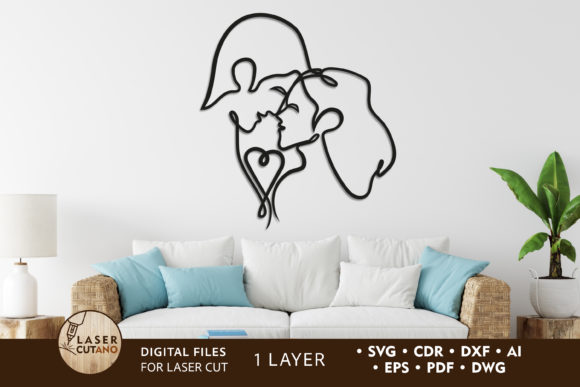
Laser Cut Metal Art: The COUPLE One-Line Design
Creating meaningful home decor or commercial signage often requires a balance between artistic vision and technical precision. For designers, hobbyists, and small business owners, finding a design that is both aesthetically striking and mechanically sound for cutting machines can be a challenge. This is where the Laser Cut Metal Art - COUPLE design steps in as a versatile solution. Specifically crafted as a one-line layout, this digital file offers a continuous, flowing aesthetic that represents unity and connection, making it an ideal choice for romantic gifts, wedding decor, or modern interior accents.
The appeal of the COUPLE one-line layout lies in its simplicity and elegance. Unlike complex multi-layered mandalas or intricate geometric patterns that require extensive assembly, this design relies on a single, unbroken path. This characteristic not only enhances its visual minimalism but also simplifies the fabrication process. Whether you are working with a laser cutter, CNC router, or plasma cutter, the continuous line reduces machine travel time and minimizes the risk of material distortion caused by excessive heat concentration in small areas.
Understanding the One-Line Aesthetic
One-line art has surged in popularity within the interior design world due to its clean, modern look. The COUPLE design, created by LaserCutano, captures this trend perfectly. It depicts two figures or forms intertwined in a seamless loop, symbolizing partnership and harmony. Because the design is vector-based, it scales beautifully without losing resolution. This means you can produce a small keychain or a large wall partition using the same source file, provided you adjust for material thickness and structural integrity.
For beginners in digital fabrication, understanding the difference between a standard vector image and a one-line layout is crucial. Standard vectors may have overlapping paths or closed shapes that require the cutting head to lift and move frequently. In contrast, the COUPLE one-line layout is optimized for efficiency. The cutting tool follows a single path from start to finish, resulting in smoother edges and a more professional finish. This efficiency is particularly valuable when working with expensive materials like stainless steel or acrylic, where precision is paramount.
Versatility Across Materials and Machines
One of the strongest advantages of this digital product is its compatibility with a wide range of materials and machinery. The files are specially prepared for laser cutters, CNC routers, and other cutting technologies. Upon purchase, users receive a comprehensive .zip folder containing the design in multiple formats, including .AI, .SVG, .DXF, .DWG, .CDR, .EPS, and .PDF. This variety ensures that regardless of your preferred software—whether it’s Adobe Illustrator, CorelDRAW, AutoCAD, or LightBurn—you can import the file without conversion issues.
Recommended materials for this project include:
- Plywood and MDF: Ideal for indoor wall art and rustic decor. These materials are easy to cut and paint.
- Acrylic and Plexiglas: Perfect for modern, glossy finishes. Backlit screens made from acrylic can create stunning lighting effects when paired with LED strips.
- Metal: Suitable for durable outdoor signs or industrial-style interior pieces. Note that metal cutting requires higher-powered lasers or plasma cutters.
- Cardboard and Paper: Great for prototyping or creating lightweight, temporary event decorations.
The recommended material thickness ranges from 3 mm to 6 mm (approximately 1/8 inch to 1/4 inch). This range provides enough structural rigidity for the piece to hold its shape while remaining thin enough for most desktop laser cutters to handle efficiently. If you are using thicker materials, you may need to adjust the kerf width and power settings on your machine to ensure a clean cut.
Practical Applications and Use Cases
The COUPLE one-line layout is not limited to a single application. Its adaptability makes it suitable for various personal and commercial projects. Here are some practical ways to utilize this design:
- Wall Art and Decor: Mount the cut piece on a contrasting background board. For a modern look, use black acrylic on a white wall. For a warmer feel, use natural plywood on a painted canvas.
- Room Dividers and Partitions: By repeating the pattern or combining it with other geometric shapes, you can create semi-transparent room dividers. These allow light to pass through while defining separate spaces in open-plan living areas.
- Backlit Screens: Install the design over a light box. The one-line structure creates interesting shadow play and highlights the silhouette, adding depth to any room.
- Wedding and Event Signage: Use the design as a centerpiece for welcome signs or photo backdrops. Cutting it from mirror acrylic can add a touch of glamour to wedding venues.
- Custom Gifts: Personalize the design by adding names or dates alongside the couple motif. This makes for a thoughtful anniversary or engagement gift.
Important Considerations for Fabrication
While the COUPLE design is user-friendly, there are technical factors to consider before starting your project. The finished product size is approximately 34.6 x 33.4 inches. This is a substantial size, ideal for statement pieces. However, you have the flexibility to scale the design up or down.
Scaling Up: You can increase the size of the design for larger installations. Just ensure your machine’s bed size accommodates the new dimensions, or plan to tile the cuts if necessary.
Scaling Down: Be cautious when reducing the size. As the design gets smaller, the single line becomes thinner relative to the overall shape. If the line becomes too narrow, it may become fragile and prone to breaking, especially in brittle materials like acrylic or thin wood. Always test cut a small section when scaling down significantly.
Since this is a single-layer model, assembly is straightforward. However, if you choose to create a multi-layered effect by stacking multiple cuts, remember to paint each layer before gluing them together. This ensures even coverage and prevents visible glue marks or unpainted edges from showing in the final product.
Getting Started with Your Files
After purchasing the Laser Cut Metal Art - COUPLE package, you will receive a .zip file. It is essential to unzip this folder before attempting to use the files. Inside, you will find all the necessary vector formats. Start by opening the file format compatible with your design software. Check the scale and dimensions to match your material size. Perform a test run on scrap material to dial in your speed and power settings. This step saves time and material in the long run.
Whether you are a seasoned professional looking to expand your product line or a beginner eager to create your first piece of wall art, this one-line layout offers a perfect blend of creativity and technical ease. With high-quality vectors and broad material compatibility, the COUPLE design empowers you to bring your ideas to life with confidence.